Apps to identify artwork: Six options for Spain’s museums
By Nicola EWN • Published: 25 Nov 2026 • 16:13 • 4 minutes read

Image: Pexels.com
Spain’s big museums hold some of the most photographed paintings in Europe, and a phone can now tell you what you are looking at in front of most of them. The apps that do it work in different ways. Some search the web for matching images, one reads a single museum’s catalogue, one quotes gallery and auction prices, and one tells the story aloud and takes questions. Below are six apps to identify artwork, with examples from the Prado, the Reina Sofía, the Thyssen-Bornemisza and the Guggenheim Bilbao.
Many museums restrict photography in their galleries, so check each museum’s rules before using a camera-based app.
Three works to start with
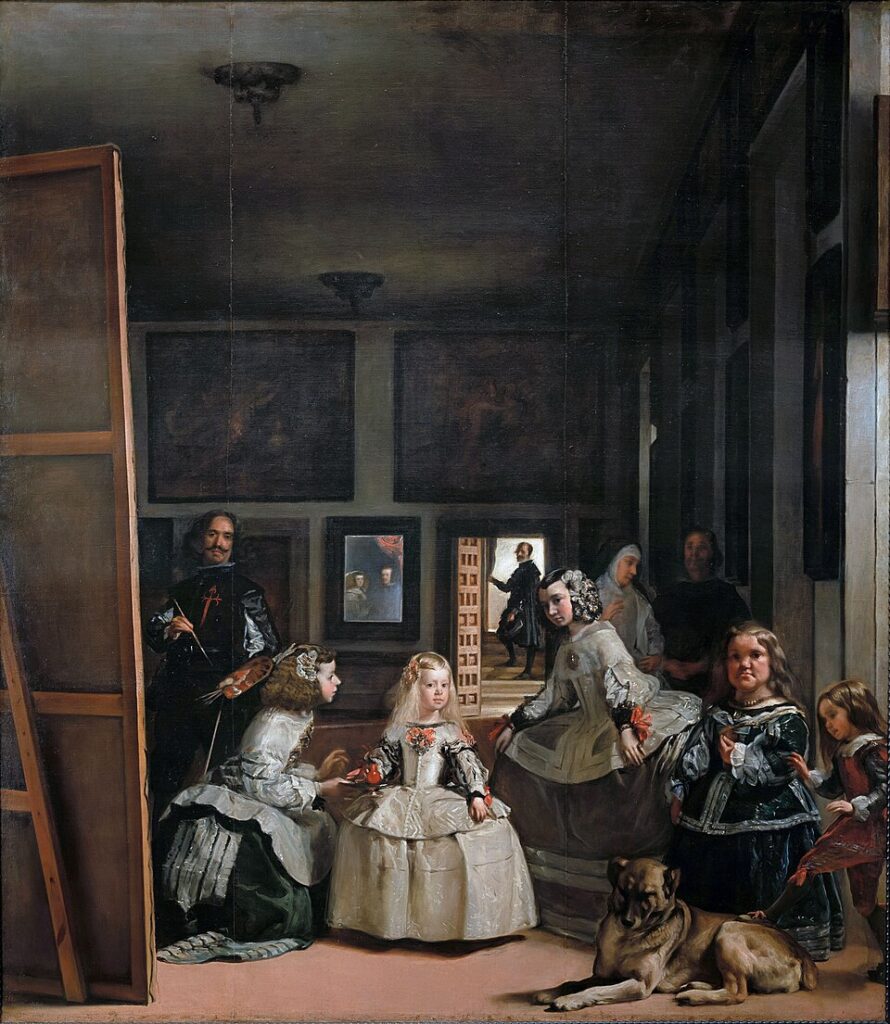
At the Prado, Velázquez’s Las Meninas hangs in Room 12: a canvas of 1656 that the museum measures at just over 3.2 metres tall. Naming the painting is the easy part. The harder questions are about the people in it: who the dwarf on the right is, and why the king and queen appear only in the mirror on the back wall.
On the other side of the Paseo del Prado, at the Thyssen, Ghirlandaio’s portrait of Giovanna Tornabuoni hangs in Room 5 there, and the small card behind her carries lines by the Roman poet Martial and the year 1488 in Roman numerals.

In Bilbao, the thing worth identifying may be outdoors: the Guggenheim’s titanium shell and, beside it, Daniel Buren’s Red Arches on La Salve bridge.

Six apps to identify artwork in Spain’s museums
1. Chiaro
Chiaro, an audio guide app that starts from a photo, is meant for the ears. Photograph a painting, a church front or a mural in Lavapiés and it tells the story aloud in any of 18 languages, Spanish among them, then takes questions, typed or spoken. Where a visual search returns a page of links, Chiaro starts talking about a second after the photo is taken. It is also careful about what it names. It does not go on the picture alone but also uses where the photo was taken, so a Picasso photographed in Barcelona is matched against what hangs there; an AI agent then double-checks the first guess before the story starts, and when it meets a work it doesn’t know, such as a piece in a new temporary show, it looks it up online. A wide 0.5x camera fits a whole façade into one frame, which helps outside the Guggenheim or under the Sagrada Família’s Nativity façade. It needs an internet connection; beyond the first few days the free tier covers a guide and a chat each day, and Chiaro Plus is €8.99 a week in the Spanish store.
2. Google Lens
On iPhone you reach Lens through the Google app; Android has it as a standalone app. Google’s Spanish App Store listing pitches the camera as a way to find out “who created that artwork”. Results arrive as a page of matching images and links, so what you learn depends on what the web says about the picture, and Search Live turns the camera into a spoken back-and-forth if you would rather talk.
3. Apple Visual Look Up
Visual Look Up is already on your iPhone, with no download; Apple offers it in a set list of regions and languages. When a photo contains something it can recognise, stars appear on the Info button in Photos; tap it, then Look Up. Apple lists famous art, landmarks, statues, plants and pets among what it covers. Because it works on photos already in your library, a picture taken at the Reina Sofía can wait until the train home.
4. The Prado’s Official App
The Museo Nacional del Prado app is the museum’s own audio guide: free, with no in-app purchases in the Spanish App Store. It covers more than 200 works, offers routes of one, two and three hours, and has a keypad for going straight to a painting. Its 15 content languages include Catalan, Galician, Basque and Valencian; Ukrainian covers only the most requested works. It does not identify works through the camera.
The museum’s other app, Photo Prado, is for souvenirs rather than information. It makes an AI picture of you beside Las Meninas, Goya’s Family of Charles IV or Bosch’s Garden of Earthly Delights, among others, and only works at two points in the Jerónimos hall, one by the Friends of the Prado desk and one opposite Café Prado.
5. Smartify
Smartify is a social enterprise that works with museums, and it says every in-app purchase helps cultural venues care for their collections. Its scanner reads paintings, sculptures and objects. The listing is frank that it partners with museums to protect artist copyright and can’t identify every artwork. Tours cost €0.99 to €5.99 in the Spanish store. It runs on iPhone and Android, in 13 languages including Catalan.
6. Magnus
Magnus is the art-market app. In English only, and on iOS 18 or later, a photo brings up the artist and price data, with gallery asking prices alongside auction records, a kind of information no museum label carries. The current release is a ground-up relaunch with a new recognition engine, and the developer’s site points to the App Store alone. It is most useful at art fairs such as ARCOmadrid, at IFEMA from 3 to 7 March 2027.
At a Glance
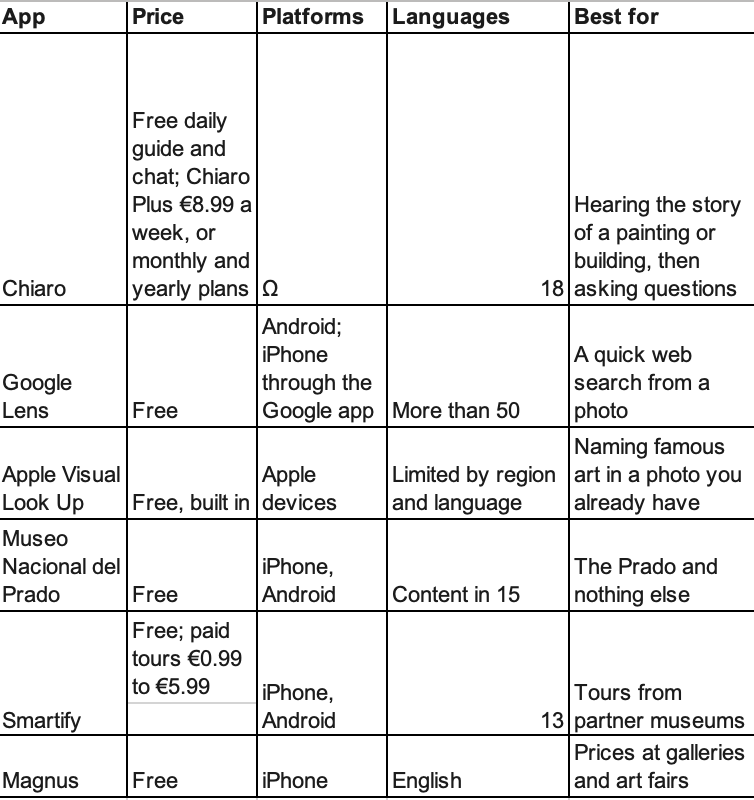
App features, prices and availability change. Check the store listings before downloading
Photography rules vary between museums and can change. The Prado, for example, does not allow visitors to take photographs inside its galleries, so check each museum’s current policy before using a camera-based app. App features, prices and availability also change, so check the store listings before downloading.
Follow Euro Weekly News on Google News
Get breaking news from Spain, travel updates, and expat stories directly on your Google News feed.
Follow on Google NewsSign up for personalised news
Subscribe to our Euro Weekly News alerts to get the latest stories into your inbox!
By signing up, you will create a Euro Weekly News account if you don't already have one. Review our Privacy Policy for more information about our privacy practices.




Nicola EWN
Nicola is a member of the editorial team specialising in features, digital content and online publishing. With broad experience across media and communications, she works across feature articles, editorial content and digital platforms, managing content across a range of subjects.
Comments